How big is 3MB?
The tradeoff we face while installing dependencies.

Setting the stage
We are soon going to release the new pitch deck app which allows you to download your very own pitch deck in PDF! When the changes were committed and being deployed, we ran into a strange problem. The deployment would run for 10 minutes - before the timeout of 30 minutes had reached - and crash without presenting any useful error message. Thus - for me - the task at hand was to fix this issue and run the deployment successfully.
Our infrastructure consists of a single VPS with 1 CPU core and 1 GB RAM. We host our website on it and run our deployment server as well. It sufficed our daily needs. There are a lot less moving parts in this system. So to figure out what went wrong will be straightforward. Thus began the investigation.
Is 1 GB enough?
I started by logging on to the server and monitoring the processes and started the deployment pipeline again to find clues as to which process is being killed in the pipeline. The deployment started and CPU usage peaked. I was closely following the processes which were topping the list on CPU usage. I didn't have to wait too long before I noticed the problem. The npm run build - which runs vite build - for the frontend was gobbling up half the memory (around 500 MB) and I guessed it wanted more but couldn't get it. So the process which would take around 200 MB and 7 seconds, now wanted more than 500 MB and couldn't bring itself to completion. Fast forward 10 minutes and the process would crash failing the pipeline.
I wanted to know how much of the memory it's trying to consume so I tried to run it on my local machine. I hit npm run build and stared at the task manager. The node process running npm slowly started to take more and more memory. 100 MB, 200 MB, 300 MB, 500 MB. It kept climbing. In 5 seconds - the time by which it should have ended - consumed 1500 MB. It looked like 400 MB of free memory wasn't enough for our build. The solution simply would be to upgrade the server for more memory. Anyways for this day and age you need at least 4 GBs of RAM to run anything. But then - there is this voice in my head - which spoke: "It should NEVER take so much memory!".
I started to wonder "It ran perfectly well the last time. So, What changed? The only new package I installed was plotly.js". So, I checked out the previous commit which didn't have plotly.js and ran npm run build on frontend. Low and behold, it took around 200 MB and 5 seconds. Now I knew who to interrogate.
Surely you are joking, plotly.js!
It was clear that plotly.js was the offending package. My immediate guess was - probably the appropriate one - that I must reduce the bundle size of plotly.js. There are costs and benefits to think about as I arrive at this conclusion. First, the benefit - and the only one - plotly.js will provide all the dials and knobs to adjust the graph - I am trying to plot - in just the way I want without thinking about its implementation. Second, I am only plotting one simple graph using only the Line (Scatter) chart so importing the whole library to draw a simple SVG seems to be overkill. We can find alternatives to plotly.js which has less of an imprint on the bundle size. If I move on to a different library then I would need to tweak the code to arrive at the same graph that I am currently plotting. This will cost me time so I must keep this as a last resort. Only after I exhaust all the ways in which I can make the existing code work, I will look for a different library.
First order of business, measure the bundle size of plotly.js. Well this is easy, we'll just look at the published npm package. It turn out to be 60.4 MB. This is far more than I imagined. Surely - when we build our frontend - the bundle used by plotly.js should be far less than 60.4 MB. Anyways I am using just one chart. Thus, it should be the only one imported. To test this we must figure out a way to measure our packages' bundle sizes.
I found this vite plugin which does the job. I tried running npm run build with this analyzer. The build completed taking upto 1700 MB of memory. But it crashed the analyzer with the error for insufficient heap memory.
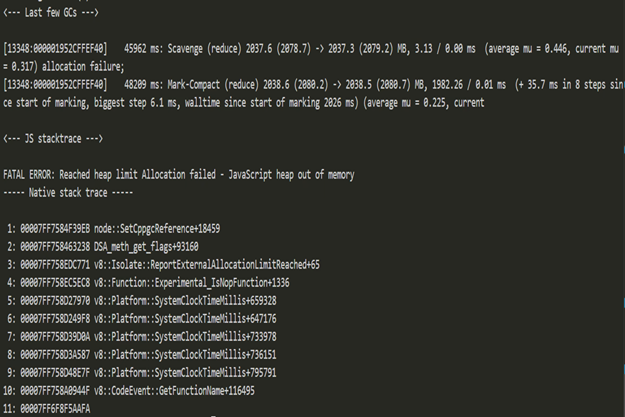 Bundle analyzer crash
Well well well, I need to figure out a way to reduce the bundle size just so that I'll be able to measure it. I could just simply swap the package plotly.js with the plotly.js-dist which has a lower bundle size of 10.8 MB. Hoping that this will work, I hit npm run build. The insufficient heap memory error persists. So, I tried a leaner package plotly.js-basic-dist which has a bundle size of 2.87 MB. "Surely" - as I said to myself - "this should work". The build took upto 985 MB and the analyzer peak at around 2000 MB. The picture it painted made one thing loud and clear.
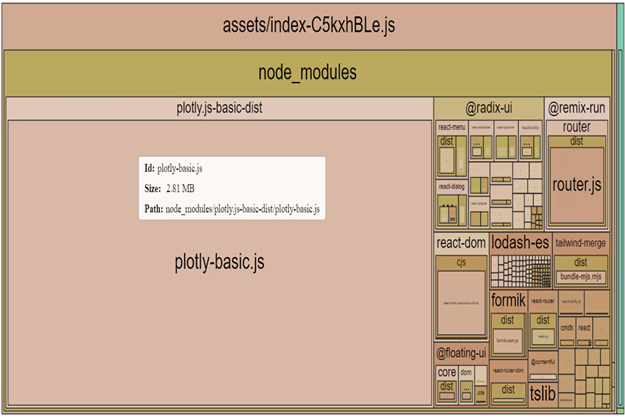 Bundle analyzer with plotly basic dist
No matter the package I use, plotly.js will have a huge bundle size. Sure, there is a way to custom build plotly.js and only import Scatter plot but at this point, any amount of work to reduce its bundle size is at par with replacing it with another package.
Finding Alternatives
There are several alternatives to plotly.js but I found three packages which aren't as bloated as plotly.js.
I liked the idea of using just SVG to plot the graph. This would allow me to choose the background myself. Maybe even seamlessly integrate it in my slides. So I decided to pick one with the SVG plots. I picked D3.
It took some time to actually write the code as I was learning how SVG works and how D3 work at the same time but I did manage to plot the graph pretty much like the previous one within a day. Analyzing the bundle would result in this pretty picture.
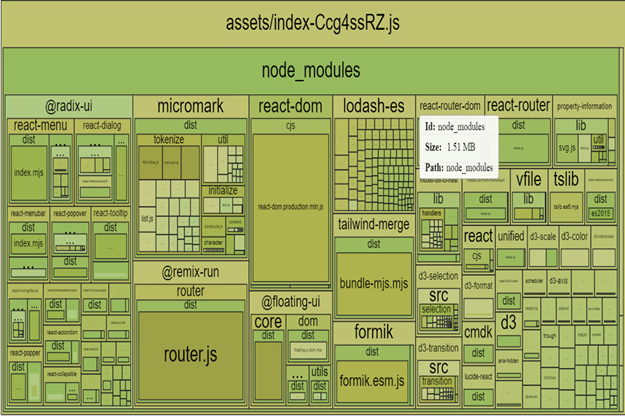 Bundle analyzer with D3
Now the build will take 13 seconds with memory upto 400 MB. This finally allowed me to run the deployment on the server. Hurray!
Tradeoffs
Engineering is - in part - about tradeoffs. In this case, I could have upgraded the server to get more juice to just build the bundle. This would have saved me time at the cost of more resources. There is another tradeoff hiding in plain sight which is of complexity. Bringing in a package which consume all your resources at the benefit of ease is tough for me to buy. We should be suspicious about packages which brings in more code than it uses. It certainly hides components which may be benign, may be malicious but for sure are of no immediate use and thus best categorized as "unknowns".
I believe that we must not introduce more unknowns into a system at the cost of ease. It's almost always the case that - overtime - the hidden complexities are going to drag you down... into the underworld. We must fight the dragons of complexity and eliminate them one by one to keep our systems functioning. As I say this, the voice in my head screams "The biggest complexity is building the bundle itself. You SHOULD eliminate the ...". Well, we'll follow this path of adventure another time.
Thanks to Namrata Devadiga and Ritesh Raut for reading the drafts of this.